The Ultimate Airbnb Host Security Checklist for 2024
Protect your Airbnb property, guests, and income with this practical security checklist. No monthly fees, no drilling required.

David Chen
Tech Reviewer & Airbnb Host
David reviews smart home tech and manages short-term rentals. He knows exactly what hosts need to keep guests safe without intrusive setups.
The Ultimate Airbnb Host Security Checklist for 2024
Hosting on Airbnb in Los Angeles can be incredibly rewarding — but it also comes with real responsibilities. You're handing over access to your property to strangers, often while you're not home. A single incident — a break-in, a water leak, a guest locked out at midnight — can cost you hundreds of dollars, tank your reviews, and disrupt your income stream.
The good news? Building a smart, reliable security setup doesn't have to mean expensive professional installations, ongoing subscription fees, or permanent modifications to your unit. This checklist walks you through every layer of Airbnb host security, from the front door to the back bedroom — with practical, renter-friendly solutions that work whether you own your property or lease it.
1. Control Who Gets In (and When)
Access control is the foundation of any solid Airbnb security setup. Physical keys are a liability — they can be copied, lost, or simply not returned. Smart locks solve all three problems at once.
What to look for in an Airbnb smart lock:
- Unique access codes for each guest (so you can disable codes after checkout without changing hardware)
- Remote lock/unlock capability via smartphone
- Auto-lock functionality so the door secures itself
- No-drill or minimal-installation designs for rental properties
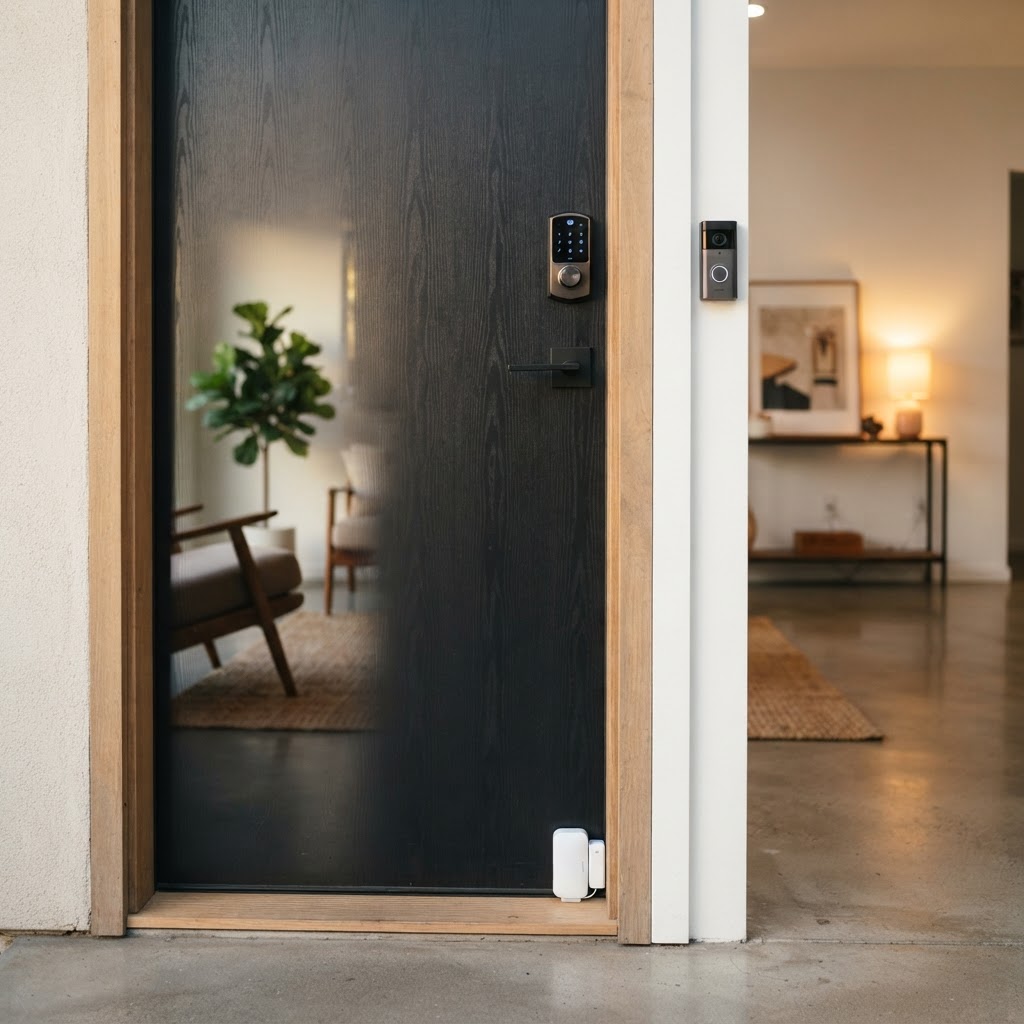
Cryptronics smart locks are designed with exactly this use case in mind. You can generate a unique code for each guest, set it to expire automatically at checkout time, and monitor entry history — all from your phone. No locksmith visits. No key handoffs at odd hours. And because installation requires no permanent modifications, you stay on good terms with your landlord or HOA.
Why Cryptronics: No monthly fees, 2-year warranty, and 30-day returns mean you can try it risk-free.
2. Monitor Entry Points Without Invading Privacy
Airbnb's policies are clear: no cameras inside private spaces like bedrooms or bathrooms. But monitoring exterior entry points — your front door, driveway, patio, or common areas — is not only allowed, it's smart hosting.
Key entry points to cover:
- Front door (video doorbell or exterior camera)
- Back door or side gate
- Garage or parking area if applicable
- Ground-floor windows in common areas
A Cryptronics video doorbell lets you see who's at the door in real time, receive motion alerts, and review footage when something feels off — all without paying a monthly cloud storage fee. Pair it with a Cryptronics outdoor camera for broader coverage of your driveway or patio.
For doors and windows you can't easily cover with a camera, door and window sensors are a low-cost, high-value solution. They trigger an alert the moment a door or window opens unexpectedly — critical for after-checkout gap days or between cleanings.
- Easy peel-and-stick installation — no drilling, no damage
- Instant smartphone notifications
- Works independently or alongside cameras
3. Protect Against Fire, Carbon Monoxide, and Water Damage
Most hosts obsess over break-ins but overlook the property damage risks that are statistically far more common: kitchen fires, HVAC issues, and water leaks. These can destroy a property, harm guests, and expose you to serious liability.
Your safety device checklist:
- ✅ Smoke detector in every bedroom, hallway, and kitchen area
- ✅ Carbon monoxide detector if you have gas appliances or an attached garage
- ✅ Water leak sensors under sinks, near the washing machine, and behind the refrigerator
Cryptronics smoke detectors and water leak sensors connect to your smart home system and send real-time alerts to your phone — so even if you're across town (or across the country), you know the moment something goes wrong. Water leak sensors are especially underrated: a slow leak under a sink can cause thousands of dollars in damage before anyone notices. A $30 sensor can prevent a $5,000 repair bill.
Why Cryptronics: Our sensors require zero professional installation and zero monthly fees. Set them up in minutes, then forget about them — until they save you.
4. Prevent Electrical Hazards and Guest Misuse
This one surprises a lot of hosts: electrical overloads and appliance misuse are a genuine risk when you have rotating guests who aren't familiar with your space.
Smart power strips are an underutilized tool in Airbnb hosting. Cryptronics smart power strips let you:
- Monitor real-time energy usage remotely
- Set schedules so devices power down automatically at checkout
- Receive alerts for unusual power draws that could indicate overloads
- Protect sensitive electronics like TVs and sound systems from surge damage
Beyond safety, this also helps you control utility costs — especially relevant if your Airbnb listing includes electricity in the nightly rate.
5. Create a Guest-Friendly Experience Without Sacrificing Security
Here's a truth that experienced hosts know: the best security setup is one your guests barely notice. Clunky systems, confusing lock codes, and triggering false alarms create bad reviews. Seamless systems create five-star stays.
Tips for balancing security and guest experience:
- Use a smart lock with a simple keypad — guests shouldn't need an app to get in
- Place door/window sensors discreetly so they blend into the space
- Make sure smoke and CO detectors are functional but not excessively sensitive to normal cooking
- Include a brief, friendly note in your guest welcome guide explaining the security features in place (this also builds trust)
- Test every device before each new booking
All Cryptronics products are designed with simplicity in mind. Clean aesthetics, intuitive setup, and reliable performance mean your guests get a premium experience and you get peace of mind.
Why Cryptronics: Every product ships with clear setup instructions and is backed by a 2-year warranty — so if anything goes wrong, we've got you covered.
Your Quick-Reference Airbnb Security Checklist
Access Control
- [ ] Smart lock with guest-specific codes installed on front door
- [ ] Back door or secondary entry secured
Monitoring
- [ ] Video doorbell at main entrance
- [ ] Outdoor camera covering driveway or patio
- [ ] Door/window sensors on all ground-floor entries
Safety Devices
- [ ] Smoke detector in kitchen, hallways, and each bedroom
- [ ] Carbon monoxide detector (if applicable)
- [ ] Water leak sensors under sinks, washer, and refrigerator
Electrical Safety
- [ ] Smart power strip protecting entertainment and electronics areas
Guest Experience
- [ ] Security features documented in welcome guide
- [ ] All devices tested before each new booking
Final Thoughts
Securing your Airbnb doesn't require a massive budget, a professional installer, or a long-term contract with a monitoring company. The right combination of smart locks, sensors, cameras, and safety devices — all manageable from your phone — gives you complete visibility and control over your property, no matter where you are.
Cryptronics was built for exactly this kind of setup: practical, no-subscription smart security that works for renters, owners, and hosts alike. With no monthly fees, no-drill installation options, a 2-year warranty, and a 30-day return policy, there's no reason to wait until something goes wrong.
Start with the front door. Add layers from there. Your guests — and your five-star rating — will thank you.