Smart Home Security for Beginners: Where to Start
New to smart home security? Learn exactly where to start, what devices matter most, and how to set up protection without drills or monthly fees.

Elena Torres
Security Systems Consultant
Elena advises property owners on practical security upgrades. She specializes in no-contract, self-monitored systems for apartments and homes.
Smart Home Security for Beginners: Where to Start
Setting up a smart home security system can feel overwhelming — especially when you're not sure which devices actually matter, how much you'll spend, or whether your landlord will approve. The good news? Getting started is simpler than most people think, and you don't need to be a tech expert, own your home, or sign up for an expensive monitoring contract to protect your space.
Whether you're renting an apartment in Silver Lake, hosting guests through Airbnb in Santa Monica, or settling into your first home in the Valley, this guide walks you through the smartest way to build a security setup from the ground up — practically, affordably, and without the headaches.
Step 1: Start With Your Entry Points
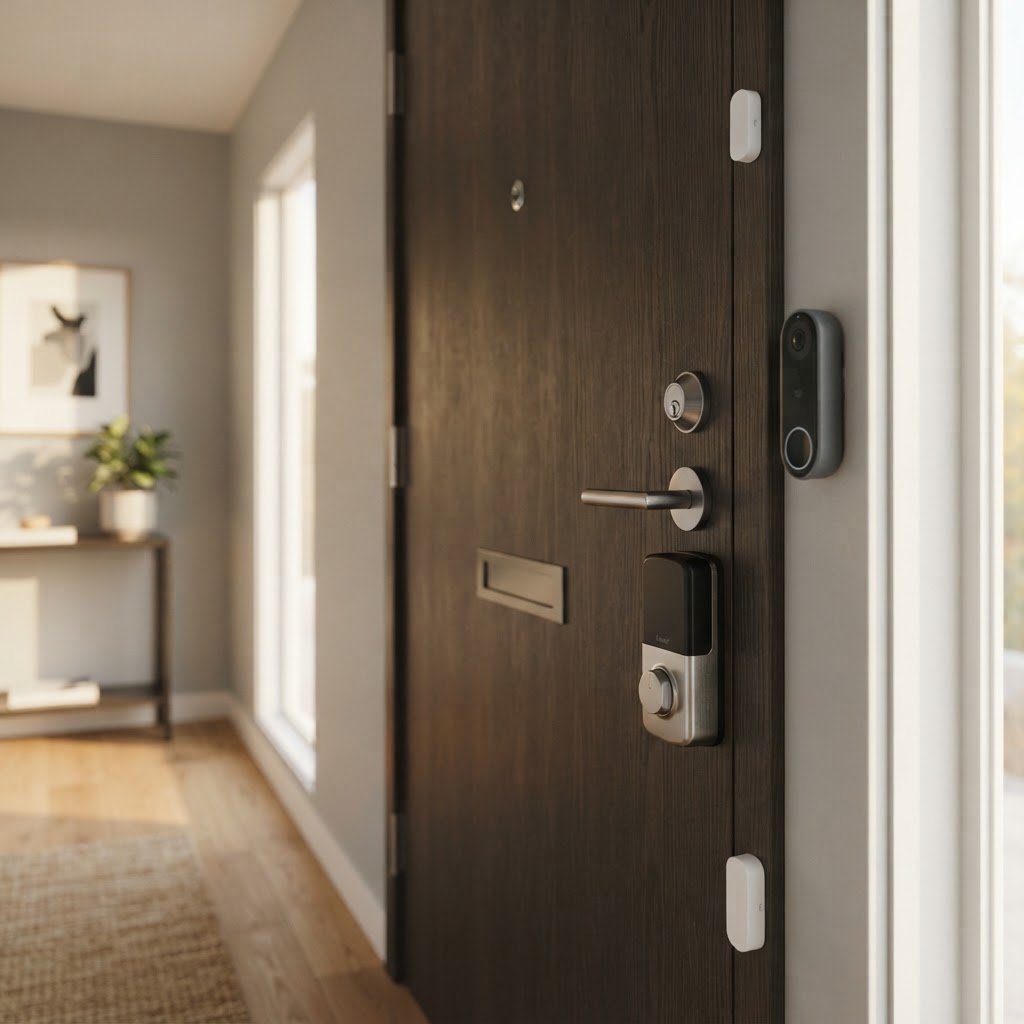
The most logical place to begin any security setup is the front door — because it's where the majority of break-ins happen. Two devices address this immediately:
A video doorbell lets you see and speak to anyone at your door in real time, whether you're home or across town. Look for one with motion detection and night vision so you're covered around the clock.
A smart lock replaces or augments your existing deadbolt and lets you lock or unlock your door remotely, share access codes with guests or family, and get alerts when someone enters. Cryptronics smart locks are designed for renter-friendly installation — no drilling, no permanent modifications — so you can take them with you when you move.
- Grant temporary access codes to dog walkers, housekeepers, or Airbnb guests
- Lock your door remotely if you forget on the way out
- Get real-time notifications every time the door is accessed
- No locksmith needed for re-keying when guests change
Why Cryptronics: Our smart locks come with a 2-year warranty and 30-day return policy, so you can try before you fully commit.
Step 2: Add Door and Window Sensors
Once your front door is covered, think about your secondary entry points — side doors, sliding glass doors, windows at ground level. This is where door and window sensors become invaluable.
These small, discreet devices attach to the frame and moving part of any door or window. When the two pieces separate — meaning something opened — you get an instant alert on your phone. They require no wiring, install in seconds with adhesive backing, and are completely renter-friendly.
For an apartment or small home in LA, a set of four to six sensors typically covers all the critical openings. It's one of the most cost-effective security layers you can add.
- Instant mobile alerts when any entry point is opened
- Works while you're asleep, at work, or traveling
- Adhesive mount — no drilling, no damage to door frames
- Small enough to go unnoticed by guests or visitors
Step 3: Cover Your Interior and Exterior With Cameras
Cameras serve two purposes: deterrence and documentation. A visible camera outside your front door or in a common area discourages opportunistic crime. Footage stored on the device gives you evidence if something does happen.
Cryptronics indoor and outdoor cameras are built for straightforward setup — no professional installation, no monthly cloud storage fees. Place an outdoor camera above your entryway or facing a parking area. For renters or Airbnb hosts, an indoor camera in a living room or near the front door adds a layer of interior visibility without invading private spaces.
For Airbnb hosts specifically: Cameras placed in common areas (with proper disclosure to guests, as required by platform rules) provide accountability and peace of mind on both sides.
- HD video with night vision for 24/7 clarity
- Motion-triggered recording so you're not sifting through hours of footage
- Local storage — no subscription required
- Weather-resistant options for outdoor use in LA's sun and occasional rain
Why Cryptronics: No monthly fees means your security cost is predictable. Pay once, stay protected.
Step 4: Don't Overlook Environmental Hazards
Security isn't only about intrusion. Some of the most costly and dangerous incidents in the home are environmental — fires, gas leaks, and water damage. Beginners often skip these devices, but they're essential.
Smoke detectors with smart connectivity alert your phone even when you're not home — critical if you're an Airbnb host with guests staying while you're away, or a renter in an older building.
Water leak sensors placed under sinks, near washing machines, or beside water heaters can catch a slow leak before it becomes a flood. In Los Angeles, where older plumbing is common and water damage claims are expensive, this is a small investment with significant upside.
- Phone alerts the moment smoke or water is detected
- Compact, battery-powered, no wiring required
- Ideal for renters who can't modify existing smoke alarm systems
- Protect your deposit, your belongings, and your guests
Step 5: Tie It Together With Smart Power Management
A smart power strip might not be the first thing that comes to mind for security, but it plays a supporting role that's easy to underestimate. Schedule lights or electronics to turn on and off while you're away — creating the appearance of occupancy, which is a proven deterrent. You can also cut power remotely to devices you left on, reducing fire risk.
For Airbnb hosts, smart power strips help manage guest energy use and protect sensitive electronics between stays.
Building Your System: A Practical Starting Point
If you're working with a limited budget, here's a prioritized order to build your setup over time:
- Video doorbell — your most visible and immediate upgrade
- Smart lock — control and log who enters your home
- Door/window sensors — cover all ground-level entry points
- Indoor or outdoor camera — documentation and deterrence
- Smoke detector + water leak sensor — protect against environmental hazards
- Smart power strip — occupancy simulation and power management
You don't need everything at once. Start with one or two devices, learn how they work, and expand from there.
Conclusion
The best smart home security setup is the one you actually use — and the barrier to getting started is lower than most people realize. With no-drill installation, no monthly subscription fees, a 2-year warranty, and a 30-day return policy, Cryptronics products are designed specifically for people who want real protection without long-term commitments or complicated setups.
Whether you're renting in LA, hosting guests, or just moving into your first place, a few well-chosen devices can make a significant difference in how safe and in control you feel at home. Start at the front door, work your way through the entry points, and build from there. Security doesn't have to be complicated — it just has to be consistent.