Keypad vs Fingerprint vs App Smart Locks: Which Is Right for You?
Not all smart locks work the same way. Learn how keypad, fingerprint, and app-based locks compare so you can choose the best fit for your home or rental.

Elena Torres
Security Systems Consultant
Elena advises property owners on practical security upgrades. She specializes in no-contract, self-monitored systems for apartments and homes.
Keypad vs. Fingerprint vs. App-Based Smart Locks: Which One Is Right for You?
Switching to a smart lock is one of the fastest, most impactful upgrades you can make to your home security — whether you own your place, rent an apartment, or manage an Airbnb property. But once you've decided to go keyless, a second question immediately follows: which type of smart lock should you actually get?
Keypad locks, fingerprint locks, and app-based locks each solve the same core problem — eliminating the physical key — but they do it in different ways, with different trade-offs. Choosing the wrong type can mean frustration for guests, lockouts during phone dead zones, or a lock that simply doesn't fit your lifestyle.
This guide breaks down how each type works, who it's best for, and what to think about before you buy.
How Each Smart Lock Type Works
Before comparing them, it helps to understand the basic mechanics:
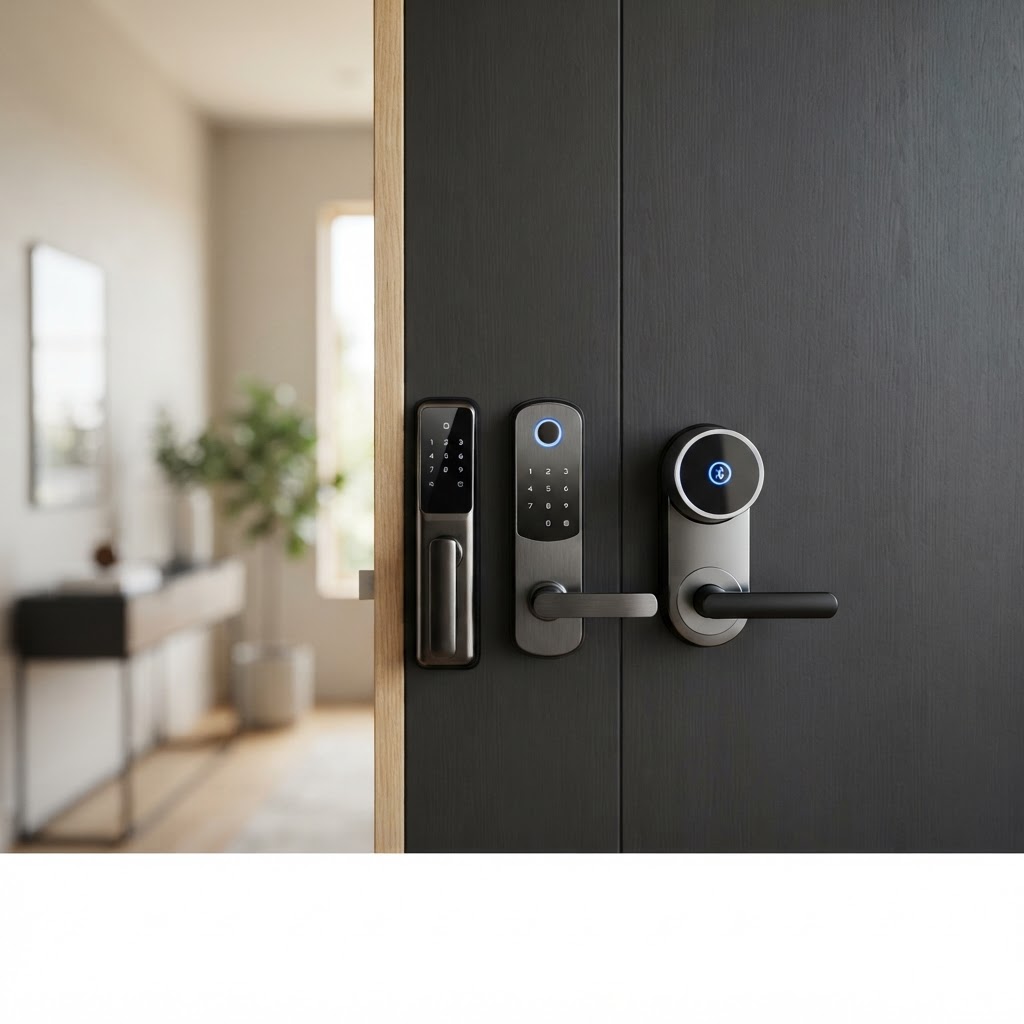
- Keypad smart locks use a numeric PIN code entered on a physical touchpad or button panel. No app, no phone — just a code.
- Fingerprint smart locks use a biometric scanner to read your fingerprint and grant access instantly. Many models also include a backup keypad or physical key.
- App-based smart locks connect via Bluetooth or Wi-Fi to a smartphone app, letting you lock and unlock remotely, share digital keys, and track entry history.
Many modern smart locks — including options in the Cryptronics lineup — combine two or more of these methods, giving you flexibility without sacrificing simplicity.
Keypad Smart Locks: Simple, Reliable, and Guest-Friendly
If there's one type of smart lock that works for almost everyone, it's the keypad. There's no app to download, no phone battery to worry about, and no fingerprint scanner to clean or recalibrate.
Best for:
- Renters who want a simple upgrade without complicated setup
- Families with kids who might lose physical keys
- Airbnb hosts who need to share access with multiple guests easily
- Anyone who wants a no-fuss, always-reliable entry method
Key advantages:
- Works even when your phone is dead or out of range
- Easy to share: just give someone a PIN
- Most models support multiple codes, so you can assign unique codes to different people and delete them when no longer needed
- Typically the most affordable smart lock option
Watch out for:
- Code sharing can get out of hand if you're not careful — it's easy to forget who has which code
- Keypads can show wear patterns over time if you always use the same digits
- Less convenient than biometric entry when your hands are full
For Airbnb hosts in particular, keypad locks are a game-changer. You can set a unique code for each guest booking and expire it automatically — no key handoffs, no lockboxes, no coordination headaches.
Fingerprint Smart Locks: Fast, Personal, and Hands-Free
Fingerprint locks feel futuristic, but they've become genuinely practical and affordable. A quick press of your finger and the door opens — no code to remember, no phone to fish out of your pocket.
Best for:
- Homeowners who want the fastest, most seamless daily entry experience
- Households where multiple people need regular, reliable access
- Anyone who frequently has their hands full (groceries, bags, kids)
Key advantages:
- Extremely fast — most biometric locks open in under a second
- No codes to share or remember
- Access is tied to a specific person's biology, making unauthorized sharing impossible
- Most models store dozens of fingerprints and include a keypad or key backup
Watch out for:
- Not ideal for Airbnb guests — you'd have to enroll every new guest's fingerprint in person
- Can occasionally misread fingers that are wet, dirty, or have cuts
- Slightly more expensive than basic keypad-only models
For a primary residence where the same small group of people comes and goes daily, fingerprint entry is arguably the most convenient option available.
App-Based Smart Locks: Maximum Control and Remote Access
App-based locks connect your door to your smartphone, giving you a level of control that physical locks simply can't match. Lock or unlock your door from anywhere, see a log of every entry, and grant or revoke access in real time — all from your phone.
Best for:
- Homeowners who travel frequently or want remote monitoring
- Airbnb hosts managing properties from a distance
- Anyone building out a broader smart home security setup
Key advantages:
- Remote lock/unlock from anywhere with a Wi-Fi connection
- Real-time entry notifications and access logs
- Easy integration with other smart home devices — pair with a Cryptronics video doorbell or door/window sensors for a complete picture of who's coming and going
- Digital key sharing via the app, with expiration and permission controls
Watch out for:
- Relies on phone battery and internet connectivity — always choose a model with a physical backup entry method
- Slightly more setup involved than a basic keypad
- If your router goes down, remote features won't work (though local Bluetooth access typically still functions)
What to Think About Before You Buy
Once you understand how each type works, the right choice usually comes down to a few key questions:
-
Who needs access, and how often? Daily household members are great candidates for fingerprint locks. Rotating guests or service providers are better served by keypad codes or app-managed digital keys.
-
Do you need remote access? If you're managing an Airbnb remotely or want to let in a dog walker while you're at work, an app-connected lock is worth the extra setup.
-
How tech-comfortable are you and your household? Keypad locks have zero learning curve. App locks require initial setup but become second nature quickly.
-
Is no-drill installation important to you? As a renter, this matters a lot. Cryptronics smart locks are designed with renters in mind — renter-friendly installation means you can set up and remove your lock without damaging your door or losing your security deposit.
-
What's your budget? Keypad-only locks are the most affordable entry point. Fingerprint and app-enabled models cost more but deliver more features. All Cryptronics smart locks come with a 2-year warranty and 30-day returns, so you're never locked into a purchase that doesn't work for you — and there are no monthly subscription fees, ever.
Pair Your Smart Lock With the Right Security Ecosystem
A smart lock is a powerful first step, but the most effective home security setups layer multiple devices together. Consider pairing your lock with:
- A Cryptronics video doorbell — see and speak to visitors before you open the door
- Door and window sensors — get instant alerts if any entry point is opened unexpectedly
- Indoor or outdoor cameras — add visual verification to your smart lock's entry logs
All Cryptronics products are designed to work without monthly subscription fees, with straightforward installation that won't require a landlord's permission or a drill.
The Bottom Line
There's no single "best" smart lock type — there's only the best one for your situation. Keypad locks win on simplicity and guest-friendliness. Fingerprint locks win on speed and daily convenience. App-based locks win on control and remote access. And the good news? Many locks offer all three in one package.
Take a few minutes to think about who's entering your home, how often, and how much remote visibility matters to you. That answer will point you straight to the right choice — and Cryptronics has options built for renters, homeowners, and Airbnb hosts at every level.