Build a Complete Smart Security Kit for Under $200
You don't need a big budget or a long-term contract to secure your home. Here's how to build a complete smart security setup for under $200.

Priya Sharma
Home Automation Writer
Priya writes practical guides for renters and first-time homeowners. She's obsessed with finding budget-friendly smart home solutions.
Build a Complete Smart Security Kit for Under $200
Smart home security has a reputation for being expensive — monthly monitoring fees, professional installation costs, and equipment that locks you into a two-year contract. But that reputation is outdated. Today, renters, homeowners, and Airbnb hosts across Los Angeles can build a genuinely effective security system for under $200, with no subscription, no drilling, and no compromise on quality.
This guide walks you through exactly how to do it.
Why $200 Is Enough (If You Spend It Right)
The secret to an affordable smart security kit isn't cutting corners — it's prioritizing the right layers of protection. Professional security consultants think in terms of detection, deterrence, and documentation. Your budget kit should hit all three.
- Detection: Know when something happens before it becomes a problem.
- Deterrence: Visible security hardware discourages opportunistic break-ins.
- Documentation: Video and sensor logs give you evidence and peace of mind.
When you skip monthly subscriptions and unnecessary extras, $200 goes surprisingly far. The key is choosing products that work together, store footage locally or on free cloud tiers, and don't require a technician to install.
The Core Kit: What to Buy and Why
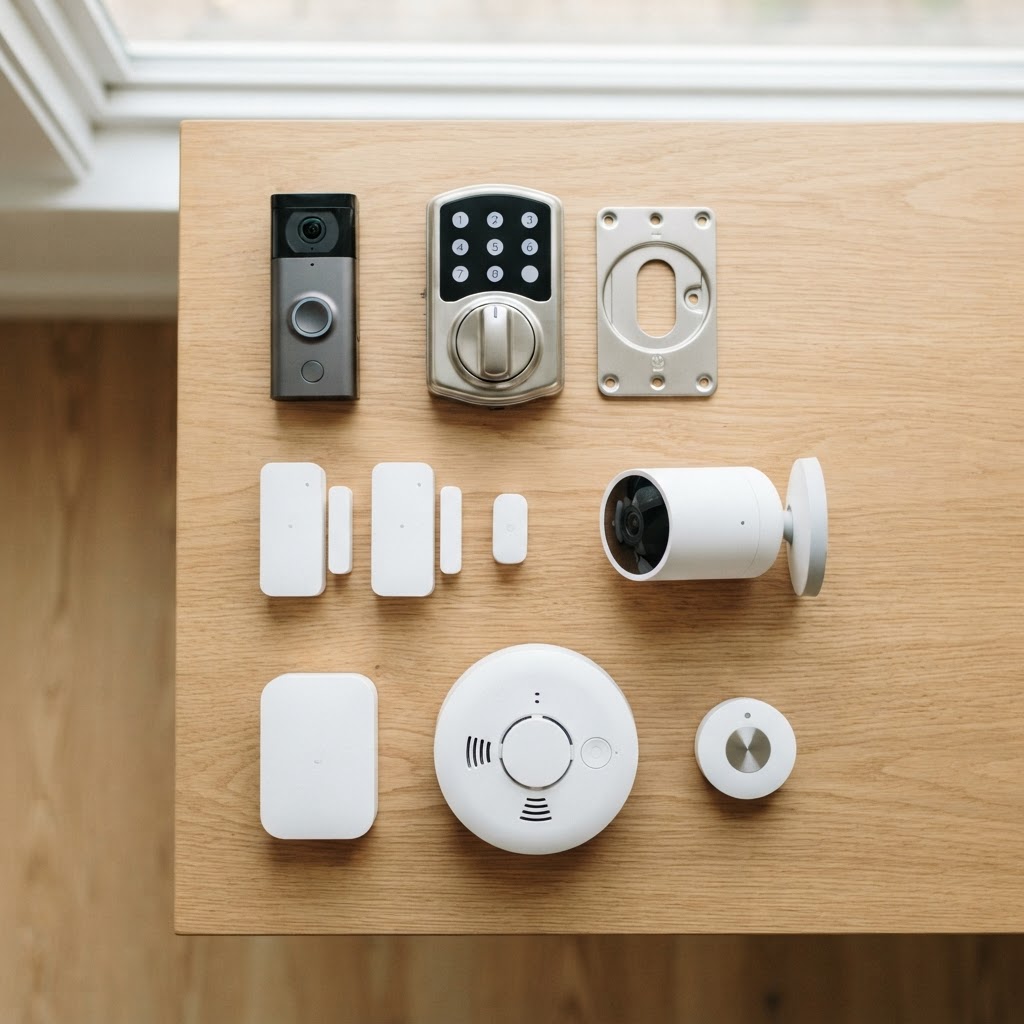
Here's a practical breakdown of what a complete under-$200 kit looks like when you shop smart.
1. Video Doorbell — Your First Line of Defense
The front door is the entry point for the vast majority of break-ins. A video doorbell covers your most vulnerable spot with live video, motion alerts, and two-way audio. For renters, look for a model with no-drill mounting options — adhesive or tension-mount brackets mean you won't lose your security deposit.
Cryptronics' video doorbell installs in minutes, works with both iOS and Android, and stores motion-triggered clips with no monthly fee required.
2. Smart Lock — Replace the Deadbolt Without Calling Your Landlord
A smart lock gives you keyless entry, guest access codes, and automatic locking — all without replacing your existing deadbolt hardware. Most retrofit smart locks attach over your existing interior hardware, making them renter-friendly and landlord-approved.
For Airbnb hosts, this is especially valuable: issue unique codes for each guest, set them to expire automatically, and never worry about copied keys again.
Why Cryptronics smart locks stand out:
- No drilling required — installs over your existing deadbolt in under 15 minutes
- Supports up to 30 unique access codes
- Auto-lock timer keeps your door secured even if you forget
- 2-year warranty and 30-day returns included
3. Door and Window Sensors — Invisible but Indispensable
Door and window sensors are the unsung heroes of any security kit. They're small, inexpensive, and tell you instantly when any entry point is opened — whether you're home or away. A pack of door/window sensors can cover your front door, back door, sliding glass door, and key windows for well under $50.
Cryptronics sensors use no-drill adhesive mounting and connect to your smartphone in seconds. Set them to alert you silently, sound a local alarm, or both.
4. Indoor Smart Camera — Eyes Inside When You're Out
An indoor security camera covers the interior of your space and acts as a strong deterrent if anyone does get past your door. Look for 1080p resolution minimum, night vision, and local storage support so you're not paying for cloud storage every month.
Place it facing your main entry point or in a living area with sight lines to multiple rooms. For Airbnb hosts, indoor cameras should always be disclosed to guests — placement in common areas is both legal and reassuring for liability purposes.
5. Smoke Detector and Water Leak Sensor — Don't Forget Non-Intruder Threats
Break-ins get all the attention, but fires and water leaks cause far more total property damage each year in Los Angeles. A smart smoke detector sends alerts to your phone the moment it detects smoke — critical if you're away from home or renting out your unit. A water leak sensor placed under your sink, near your water heater, or behind your washing machine can catch a slow leak before it becomes a $10,000 insurance claim.
Both are small, affordable, and easy to overlook — which is exactly why they're worth including in your kit.
Sample Budget Breakdown
Here's how a complete kit comes together under $200:
| Product | Estimated Cost | |---|---| | Video Doorbell | $55–$65 | | Smart Lock (retrofit) | $60–$75 | | Door/Window Sensors (4-pack) | $25–$35 | | Indoor Smart Camera | $30–$40 | | Smart Smoke Detector | $20–$25 | | Water Leak Sensor | $12–$18 | | Total | ~$202–$258 |
Mix and match based on your priorities — renters in a studio apartment might skip the indoor camera and add an extra sensor pack. Airbnb hosts might prioritize the smart lock and video doorbell above everything else. The point is that coverage is achievable at this price point without sacrificing quality or flexibility.
Tips for Getting the Most From Your Kit
Once you have your hardware, a few simple habits dramatically improve your protection:
- Place your camera strategically. Aim for coverage of the front door and any secondary entries. Height of 7–8 feet gives the best field of view.
- Use unique codes for every person. Smart locks with multiple access codes mean you always know who came in and when. Delete codes immediately when a guest or contractor relationship ends.
- Test your sensors monthly. Open a door or window and confirm your phone receives the alert within a few seconds.
- Position water leak sensors at floor level. Water travels low — putting the sensor flat on the floor near appliances catches leaks fastest.
- Don't hide your video doorbell. Visibility is part of deterrence. A clearly visible camera discourages most opportunistic theft before it starts.
What You Don't Need to Spend Money On
Part of building a smart budget kit is knowing what to leave out — at least for now:
- Professional monitoring subscriptions: Motion alerts to your phone provide effective real-time awareness without a monthly fee.
- Outdoor cameras (initially): A video doorbell covers your most important outdoor angle. Add outdoor cameras as a second phase.
- Smart power strips for security purposes: These are excellent additions for general smart home use and energy management, but they're not a security priority for your first $200.
- Hub-dependent systems: Devices that require a proprietary hub add cost and complexity. Wi-Fi and Bluetooth-native devices keep setup simple.
Conclusion
A complete smart security kit under $200 isn't a compromise — it's a smart allocation of resources. By covering your entry points with a video doorbell and smart lock, adding door and window sensors for instant alerts, monitoring the interior with a capable camera, and protecting against fire and water damage with affordable smart detectors, you've built a genuinely layered security system.
Cryptronics products are designed specifically for this kind of flexible, renter-friendly setup: no monthly fees, no-drill installation on key devices, a 2-year warranty, and a 30-day return window so you can buy with confidence. Whether you're in a Koreatown apartment, a Silver Lake bungalow, or hosting guests in a Venice beach condo, real security doesn't have to wait for a bigger budget.
Start with what matters most. Build from there.