Best smart locks for remote Airbnb hosts
Simplify your guest check-ins with our guide to the best smart locks for Airbnb. Explore top remote access, Wi-Fi integration, and keyless entry solutions for your short-term rental property.

Priya Sharma
Home Automation Writer
Priya writes practical guides for renters and first-time homeowners. She's obsessed with finding budget-friendly smart home solutions.
Best smart locks for remote Airbnb hosts
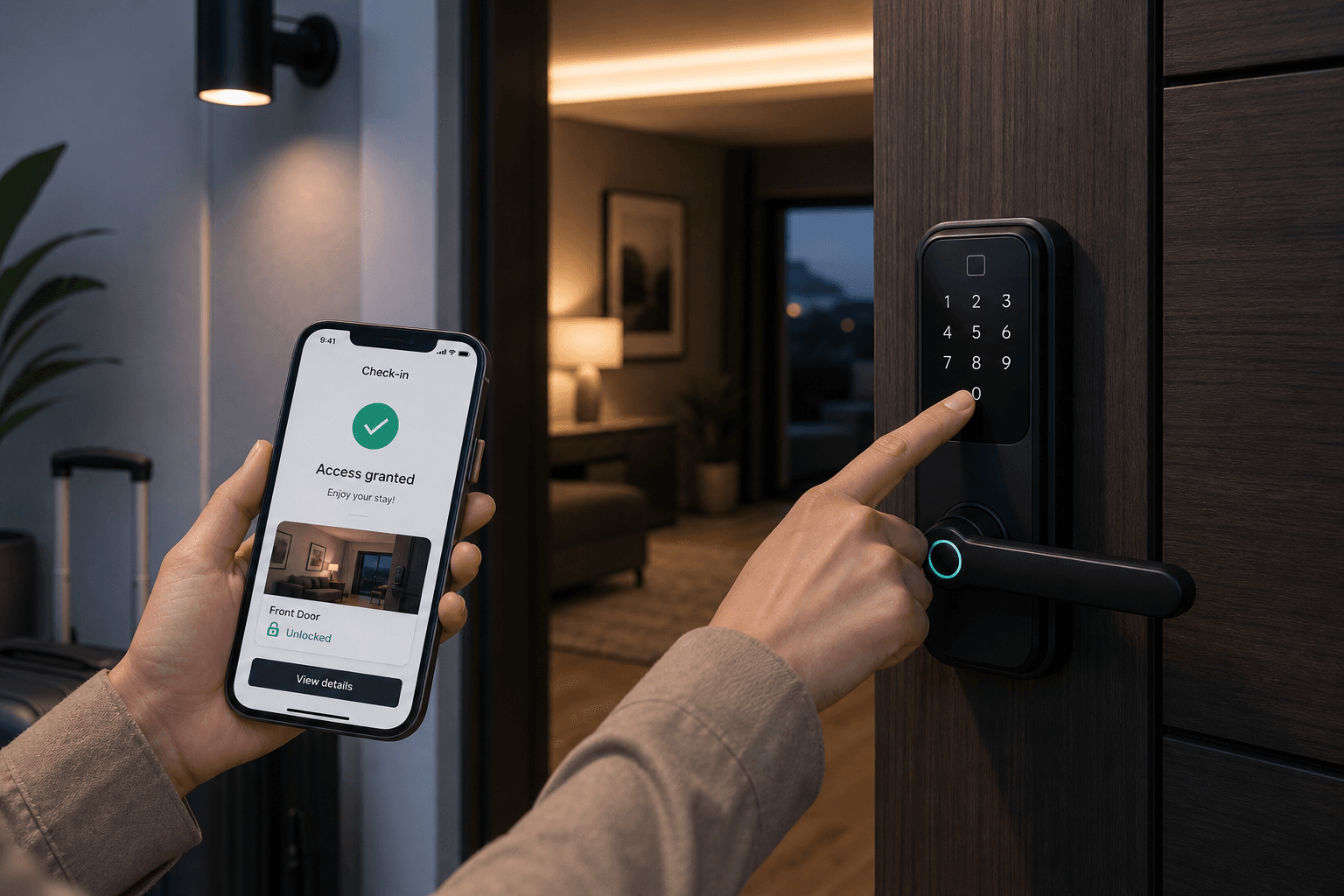
Managing a short-term rental property remotely offers incredible freedom, but it hinges entirely on one critical moment: the guest check-in. Nothing ruins a host's evening faster than a panic call at 11:45 PM from a weary guest standing on the front porch in the pouring rain because a physical key box is jammed, or the previous guest took the house keys with them.
Automated keyless entry has evolved from a convenient upgrade into the backbone of professional short-term rental management. Remote hosts need access hardware that handles automated code generation, syncs with reservation calendars, survives harsh weather, and operates smoothly even when local Wi-Fi stumbles. Host discussions across platforms like Reddit's r/airbnb_hosts show that selecting the wrong lock hardware leads to midnight lockouts, bad reviews, and constant maintenance headaches.
This guide breaks down the best smart locks for remote Airbnb hosts, analyzing integration capabilities, drill-free installation options, battery performance, emergency fail-safes, and subscription-free operation.
What Makes a Smart Lock Ideal for Remote Check-Ins?
Not every residential smart lock is equipped to handle the demands of a high-turnover rental. Homeowners buying a lock for personal use often prioritize aesthetics or single-user app controls. Short-term rental hosts require reliable automated access control that operates without host intervention.
When evaluating smart hardware for remote properties, focus on these fundamental criteria:
1. Automated PIN Code Generation
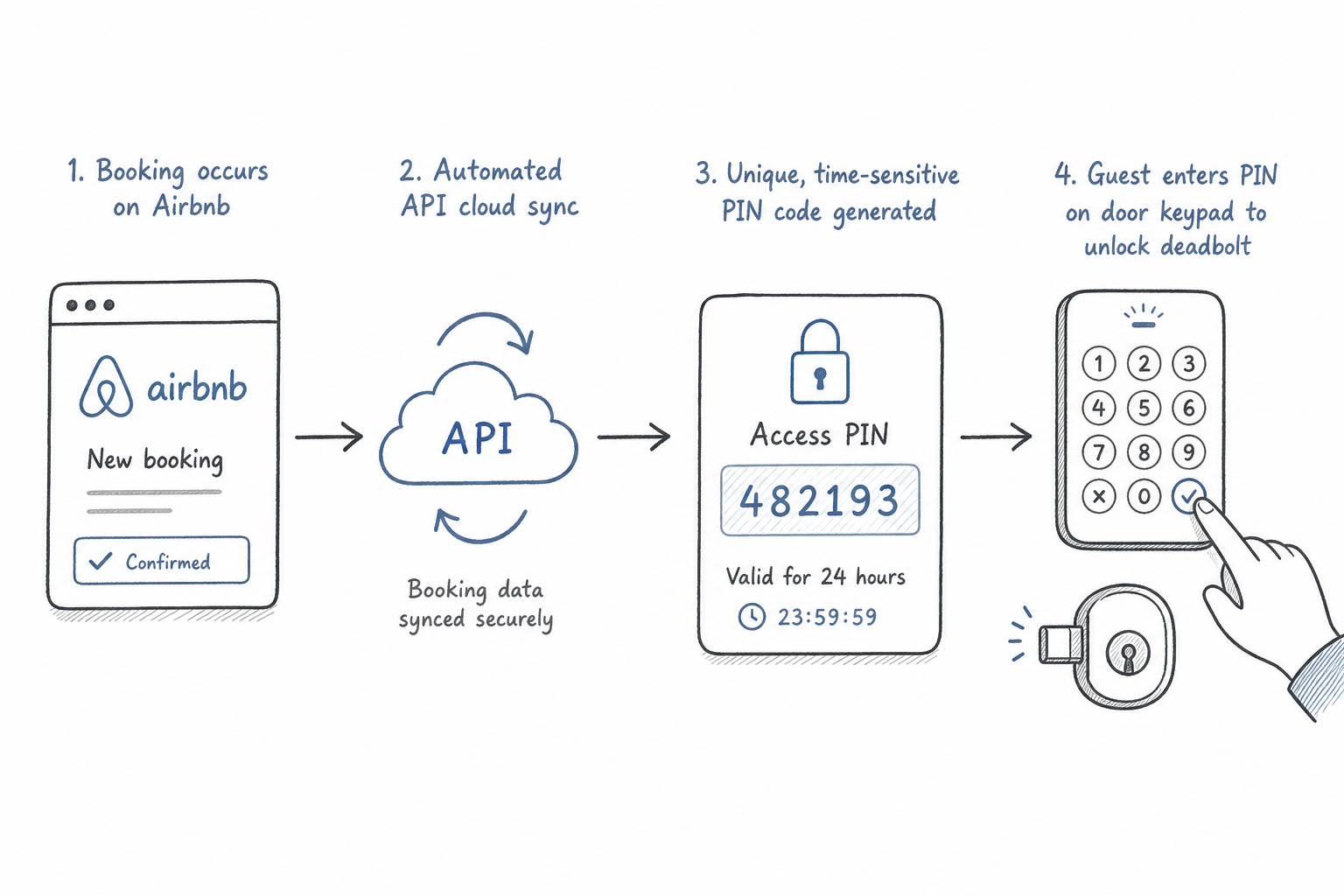
The gold standard for remote hosting is automatic code synchronization. When a guest books your property, your lock system or property management software should generate a temporary PIN (often matching the last four digits of the guest's phone number). This code must activate precisely at check-in time and expire automatically at check-out.
2. Keypad vs. App-Based Guest Access
Requiring guests to download a third-party mobile app, register an account, and enable Bluetooth to enter your property is a recipe for frustration. International travelers may lack cell data, elderly guests may struggle with app navigation, and battery-drained phones leave visitors stranded. Physical keypads with backlit push buttons or touchscreens consistently yield the highest guest satisfaction ratings.
3. Native Integrations and Middleware Compatibility
Direct integration with the Airbnb platform or popular property management systems (PMS) eliminates manual entry creation. Reliable hardware bridges the gap between your booking calendar and the physical door latch.
4. Drill-Free and Renter-Friendly Installation
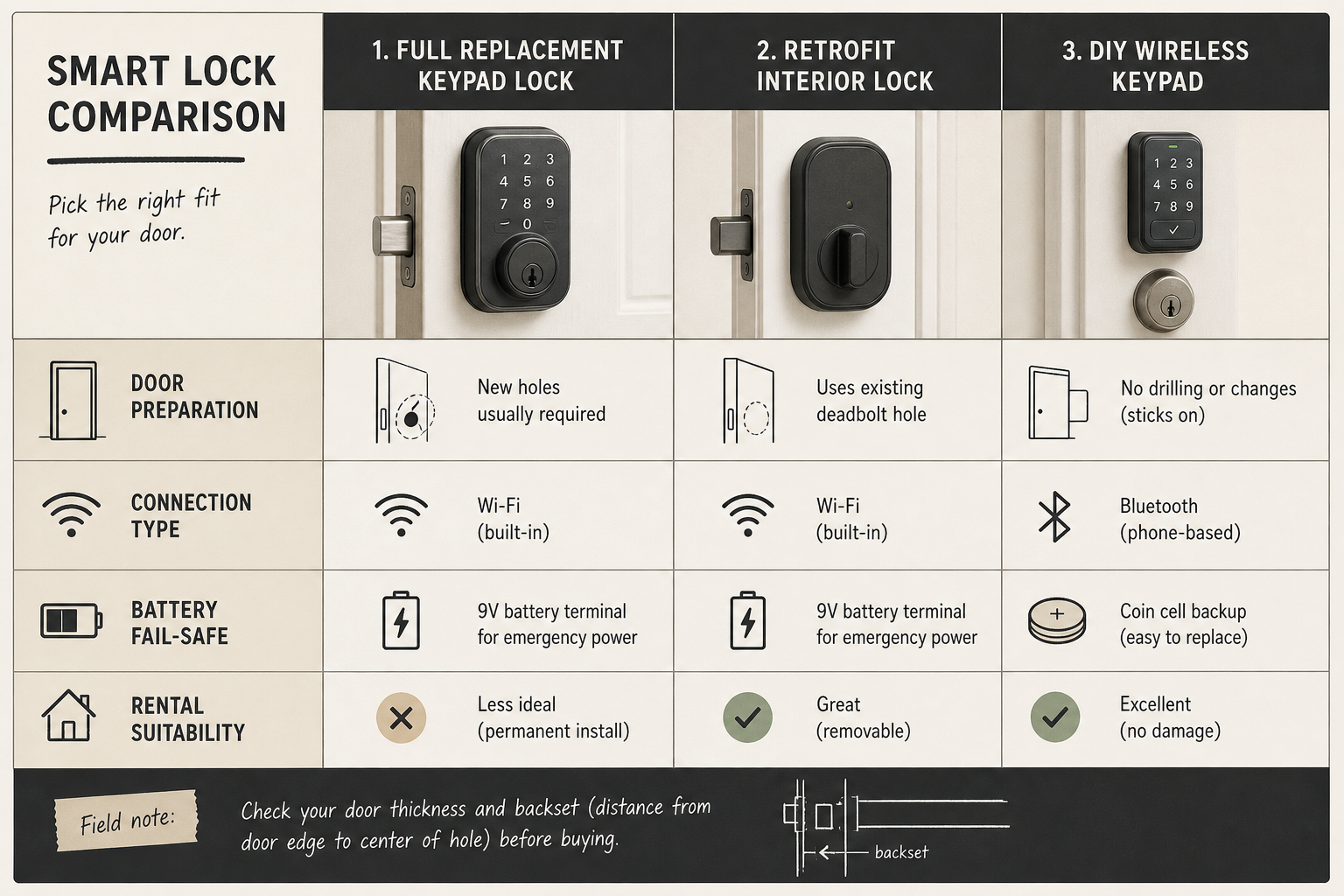
If you operate an Airbnb arbitrage business, lease your property, or manage a historic building with custom wooden doors, non-destructive hardware is mandatory. Retrofit smart locks mount onto existing deadbolts inside the door, allowing you to keep original exterior hardware intact without modifying the door frame.
5. Subscription-Free Operation
Many commercial access management platforms charge recurring monthly fees per door just to maintain remote code programming functions. Over multiple properties, these fees silently eat into operating margins. Modern hosts increasingly favor DIY smart hardware systems that offer full remote functionality without mandatory monthly subscriptions.
6. Physical Fail-Safes and Emergency Power Options
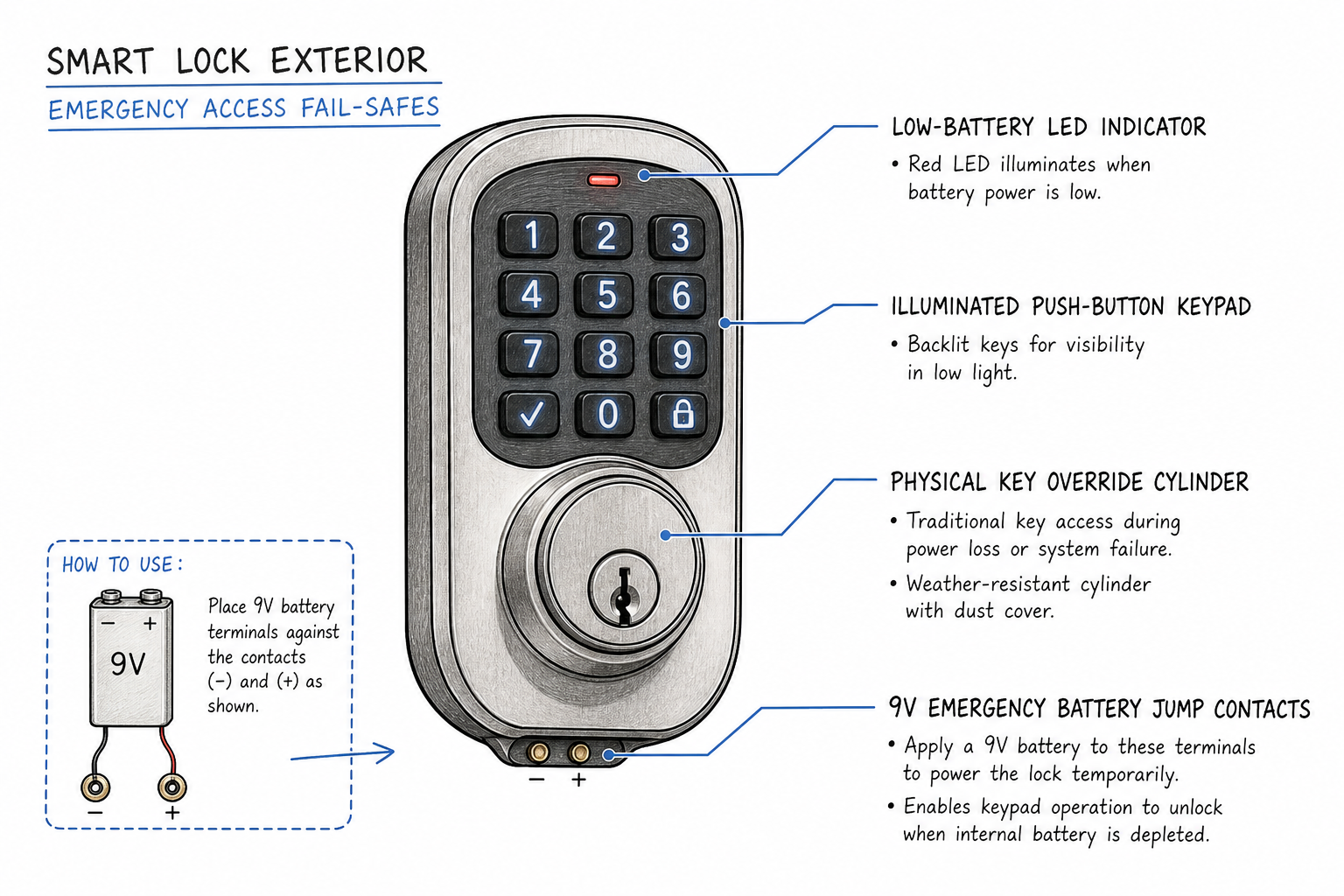
Wi-Fi routers restart, power grids fail, and batteries deplete. A robust rental lock must include physical key overrides or exterior power terminals (such as a 9V battery jump port or micro-USB connection) to prevent guest lockouts during unexpected power losses.
Top Smart Locks for Remote Airbnb Hosts Compared
Selecting the right lock depends on whether you value direct platform integration, drill-free mounting, or completely subscription-free security ecosystems. The matrix below compares top-rated locks across key remote-hosting features:
| Smart Lock Model | Keypad Type | Remote Connectivity | Airbnb / PMS Sync | Drill-Free / Retrofit | Monthly Subscription required? | Emergency Fail-Safe | Best For | | :--- | :--- | :--- | :--- | :--- | :--- | :--- | :--- | | Schlage Encode Wi-Fi | Physical Touchscreen / Push-button | Built-in Wi-Fi | Native Airbnb & major PMS | No (Full Replacement) | No | Physical Key | Busy properties with high turnover | | Yale Assure Lock 2 | Backlit Keypad / Touchscreen | Wi-Fi Module / Bluetooth | Direct PMS / Airbnb | No (Full Replacement) | No | Keyed backup or 9V contact | Multi-platform hosts needing flexibility | | August Wi-Fi Smart Lock | Optional Add-on Keypad | Built-in Wi-Fi | Airbnb & PMS | Yes (Retrofit interior turn-piece) | No | Retains Original Key | Renters and properties with custom exterior hardware | | Igloohome Smart Deadbolt | Push-button Keypad | Bluetooth / AlgoPIN (Offline) | PMS & Direct Sync | No (Full Replacement) | No | Physical Key + 9V Jump | Remote cabins with spotty or no Wi-Fi | | Cryptronics DIY Smart Keypad Lock | Physical Push-button Keypad | Wi-Fi Hub / Local RF | Manual & Flexible Code Scheduling | Yes (No-drill options available) | No (100% Free) | Physical Key + Emergency Power Jump | Budget-conscious hosts and renters seeking zero subscription fees |
Comprehensive Breakdown of Top Smart Lock Picks
1. Schlage Encode Wi-Fi & Encode Plus
Schlage has earned a reputation among hospitality professionals for mechanical durability and steady software integration. As highlighted in Guesty's guide to short-term rental smart locks, the Schlage Encode series connects directly to Wi-Fi without needing additional plug-in bridges.
- Why it works for remote hosts: The lock integrates natively with Airbnb. Once linked, temporary codes automatically reflect booking schedules. Its physical button keypad options provide tactile feedback that guests appreciate during night arrivals.
- Key Tradeoff: It requires a complete deadbolt replacement, making it less suitable for properties where door alterations are prohibited.
2. Yale Assure Lock 2
Thanks For Visiting highlights the Yale Assure series as a dependable choice for hospitality operations. The Yale Assure Lock 2 features a sleek profile and modular connectivity, allowing hosts to swap between Bluetooth, Wi-Fi, or Z-Wave modules.
- Why it works for remote hosts: Yale offers key-free deadbolt options that eliminate physical lock-picking risks altogether. If internal batteries run out completely, guests can hold a standard 9V battery against external contact points to power the keypad and type their code.
- Key Tradeoff: Touchscreen versions can become difficult to read in direct, harsh sunlight, so physical keypad variations are recommended for outdoor exposure.
3. August Wi-Fi Smart Lock
August specializes in retrofit lock technology. Instead of replacing the exterior keyhole and deadbolt mechanism, the August lock mounts over your existing interior thumb-turn assembly.
- Why it works for remote hosts: It is the premier choice for renters and properties bound by strict HOA guidelines or historic door restrictions. You can maintain your current keys while equipping the door with smart connectivity. Combining August with its companion wireless external keypad delivers keyless entry convenience for guests.
- Key Tradeoff: Because the motor moves existing deadbolt hardware, internal friction in misaligned doors can deplete batteries rapidly.
4. Igloohome Smart Deadbolt 2S
For hosts managing off-grid cabins, rural retreats, or coastal properties with spotty internet connectivity, traditional Wi-Fi locks present a challenge. Igloohome solves this problem using offline cryptographic token generation.
- Why it works for remote hosts: Operating similarly to banking security tokens, the lock uses an offline algorithm called AlgoPIN. You can generate time-sensitive entry codes from your smartphone anywhere in the world and send them to your guest. The lock decrypts and accepts the code without needing an active internet connection.
- Key Tradeoff: Because the lock remains offline, you do not receive real-time entry notification logs unless someone connects nearby via Bluetooth.
5. DIY Subscription-Free Security Ecosystems (Cryptronics)
For independent hosts, multi-unit managers, and renters building cost-effective setups, DIY security ecosystems offer a practical balance of control and value. Retailers like Cryptronics provide subscription-free DIY smart locks, keypads, and entry kits that require no invasive drilling or long-term software contracts.
- Why it works for remote hosts: Operating without mandatory monthly monitoring fees, these DIY kits allow hosts to issue unique access PINs while maintaining full control over security hardware. Their drill-free installation methods make them ideal for rental units where preserving door integrity is a contractual requirement.
- Key Tradeoff: Full automation with niche property management platforms may require manual code entry or flexible scheduling setups rather than direct API plug-and-play integrations.
Native Integrations vs. Property Management Systems (PMS)
Understanding how your lock communicates with your booking platforms is critical when scaling beyond a single listing.
[ Guest Books on Airbnb / VRBO ]
               │
               ▼
  [ Channel Manager / PMS System ]
               │
               ▼
 [ Smart Lock Integration Bridge ]
               │
               ▼
[ Unique PIN Generated & Sent to Guest ]
               │
               ▼
[ Code Valid Only During Stay Window ]
Native Platform Links
Airbnb provides direct software integration for select smart lock brands. When enabled, the platform automatically generates a unique entry PIN once a reservation is confirmed and messages the code to the guest along with check-in instructions. The code becomes active at your specified check-in hour and expires at check-out time.
PMS Middleware Platforms
If you co-list your property across multiple channels (such as Airbnb, VRBO, Booking.com, and direct booking websites), relying on a single native link is insufficient. Property management platforms like Guesty, Hostaway, and Hospitable aggregate bookings into a single calendar and connect to smart locks via middleware tools like Seam or RemoteLock.
Middleware solutions allow hosts to:
- Standardize guest PIN formats across all platforms.
- Issue distinct, time-restricted access codes for cleaning crews, maintenance team members, and property inspectors.
- Receive automated notifications if a guest attempts to enter before check-in time or remains on-site past check-out.
Real-World Failure Modes and How to Build a Bulletproof System
Even premium smart locks encounter unexpected real-world failures. Successful remote hosts build redundancy into their access workflows so that equipment malfunctions never turn into guest lockouts.
Failure Mode 1: Deadlock Misalignment and Weather Expansion
Wooden doors expand and contract with seasonal changes in temperature and humidity. If a door requires guests to push, pull, or lift the handle to align the deadbolt, an automated smart lock motor will stall and report a bolt jam error.
- The Solution: Perform regular door latch tuning. File down the interior strike plate opening so the deadbolt slides cleanly without mechanical resistance. Test your lock by gently extending the bolt while holding the door closed with ambient pressure.
Failure Mode 2: Premature Battery Depletion
Wi-Fi connectivity consumes significant power. Cold outdoor temperatures accelerate battery drain, leaving locks unpowered unexpectedly.
- The Solution: Never use cheap standard zinc batteries or generic rechargeable cells in smart locks. Always install high-grade lithium or premium alkaline batteries designed for high-drain devices. Set up automated low-battery alerts at the 20% threshold, and keep spare battery packs in a backup exterior lockbox.
Failure Mode 3: Local Internet Outages
If a storm disrupts local internet service, cloud-connected smart locks lose remote control functions, though pre-programmed PINs stored in local memory continue to work.
- The Solution: Use locks that cache active schedules locally on the hardware board. Ensure your check-in instructions include a backup access plan, such as a secondary mechanical lockbox containing a physical key.
Failure Mode 4: Guest Keypad Confusion
First-time keyless entry users may misunderstand touchscreen activation or forget to press the checkmark or lock button after typing their code.
- The Solution: Send a short 10-second video clip or annotated photo showing the exact key sequence required to open your door. Clear visual guidance eliminates 90% of guest check-in calls.
The Hidden Pitfall: Avoid Subscription Traps
As smart home adoption expands, hardware manufacturers increasingly attempt to monetize access through software subscriptions. Certain commercial lock platforms require monthly fee-per-door arrangements to preserve remote code creation, log auditing, or multi-user sharing.
For independent hosts operating on tight margins, recurring lock subscriptions represent an unnecessary cost. Over a five-year period, a $10 monthly fee adds $600 to the total cost of ownership for a single door lock.
Focus on purchasing hardware that provides robust local control, zero mandatory subscriptions, and standard open protocols. DIY smart security platforms offer powerful remote functionality without binding hosts to perpetual monthly overhead.
A Real-World Remote Host Scenario: The Midnight Arrival
Consider this typical hosting scenario: A guest booking your remote cabin experiences a three-hour flight delay, landing at 11:00 PM. By the time they pick up their rental car and navigate mountain roads in dense fog, it is 1:30 AM.
Their smartphone battery has died during travel. They arrive at your front door without cell service or access to their Airbnb app messaging.
[ App-Only Lock Setup ]                        [ Tactile Keypad + Backup Setup ]
Requires phone charge + cell data              Pre-printed pin / backlit pad
Guest phone is dead at 1:30 AM                 Guest inputs code manually
                  │                                             │
                  ▼                                             ▼
      ❌ HOST AWAKENED AT 2 AM                       ✅ SMOOTH GUEST ENTRY
- Under an App-Dependent Setup: The guest cannot open the door because the lock requires Bluetooth pairing via a mobile app. The host gets woken up in the middle of the night to manually unlock the door remotely—assuming cell service is functioning.
- Under a Tactile Keypad Setup: The guest looks at their printed itinerary or offline trip notes, inputs their four-digit PIN onto the illuminated physical keypad, and walks straight inside. The host sleeps soundly through the night.
This simple contrast demonstrates why backlit physical keypads coupled with pre-synced PINs remain the most reliable choice for remote property management.
Frequently Asked Questions
What happens if the power or internet goes out at my rental property?
Most quality smart locks store active PIN codes directly on their internal circuit boards. If power or internet drops, previously programmed guest codes continue to work. Remote modifications, log updates, and instant notifications will resume automatically once connection is restored.
Can I install a smart lock on a rental property without drilling holes?
Yes. Retrofit smart locks mount directly onto the interior side of existing deadbolts without replacing exterior keyways or drilling new holes. Additionally, DIY smart lock systems with non-destructive mounting hardware allow hosts to maintain rental compliance while offering full keyless convenience.
Should I choose a keypad smart lock or a lock that relies on a mobile app?
Keypad locks are significantly better for short-term rentals. Mobile app access forces guests to download software, register accounts, and troubleshoot Bluetooth permissions. A backlit physical keypad provides a universal, accessible entry method for guests of all ages and technical backgrounds.
How often do smart lock batteries need replacing in short-term rentals?
Under average usage (3 to 5 check-ins per week), quality lithium or high-grade alkaline batteries last between 6 and 12 months. Lock models with built-in Wi-Fi consume power faster than Bluetooth or Z-Wave models linked to a central hub. Replacing batteries every 6 months during routine property inspections prevents power issues.
How do I handle emergency access if a lock fails completely?
Always maintain a dual-layer backup plan. Install a basic mechanical lockbox containing a physical master key in a discreet location on the property (such as a side porch or rear garage post). Share this lockbox code only if the main smart lock experiences a severe hardware failure.
Final Checklist for Remote Guest Access
Before welcoming your next guest, run through this final operational checklist:
- [ ] Deadbolt retracts freely without mechanical friction or binding.
- [ ] Primary lock is powered by fresh, high-drain batteries.
- [ ] Temporary guest code generation is synced with your booking calendar.
- [ ] Emergency mechanical key is secured in a secondary backup lockbox on-site.
- [ ] Automated check-in message includes photo or video entry instructions.
- [ ] Secondary access codes are assigned for cleaning and maintenance staff.
- [ ] Zero mandatory monthly hardware subscription fees are present.